GOF AI: Agentic AI Platform

GOF AI is an agentic AI Platform that accelerates chip design. It revolutionizes interaction with EDA tools by enabling natural language commands for complex netlist ECO operations. It also generates Verilog RTL code directly from specifications, using a scoring system to help you select the most accurate version, and provides an automatic debugging method to quickly identify the root cause of non-equivalent points.

GOF Skill in Agentic AI CLI Platforms

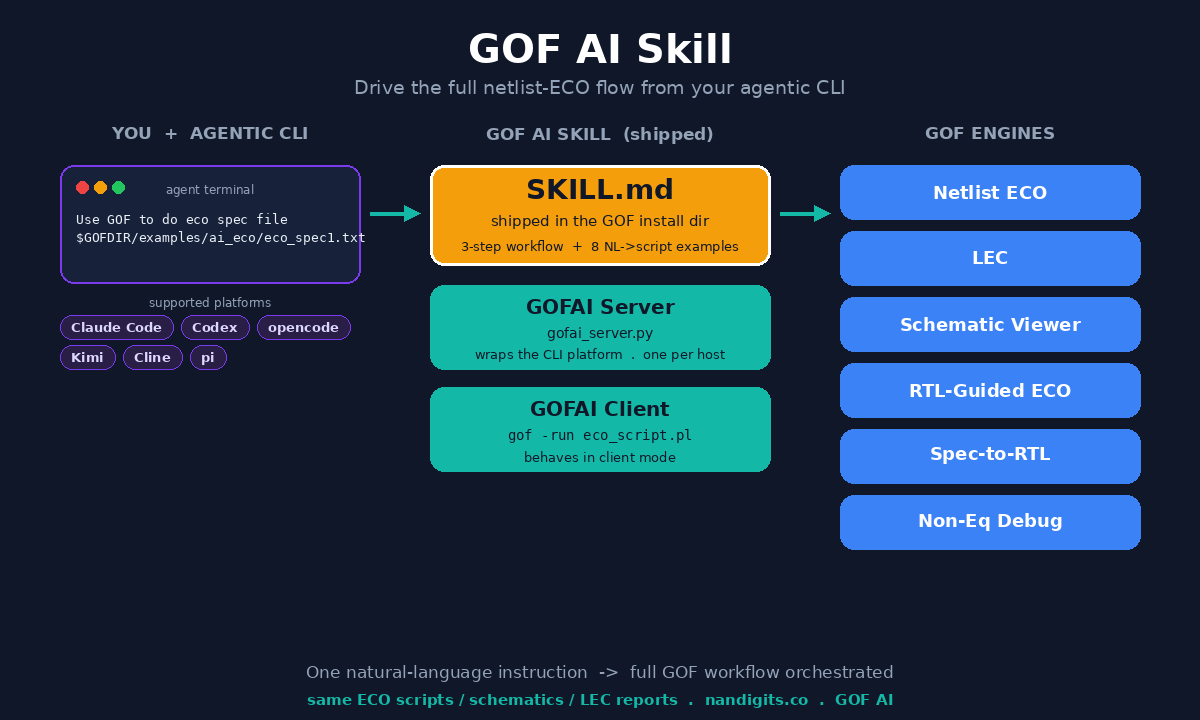
Beyond GOF's built-in natural language interface and API driven flows, GOF AI can be driven by external agentic AI CLI platforms such as Claude Code, Codex, opencode, Kimi and Cline. To make this integration seamless, the GOF release ships a skill definition file, SKILL.md, located in the GOF install directory (alongside bin/ and scripts/). The agentic CLI reads this skill to learn how to launch the GOFAI server, translate the user's natural language request into a GOF run script, and execute it end to end.

Quick Start: Set Up the GOF Skill in Claude Code

The easiest way to drive GOF AI is to register the shipped SKILL.md with the agentic CLI's own skill directory. Once registered, you can issue natural language instructions directly in the CLI and let the agent orchestrate the GOF engines end to end. The steps below use Claude Code as an example; opencode, Codex and the other supported CLIs can be set up the same way using their respective skill directories.

  1. Download and install GOF. Download the GOF release package and install it.
  2. Define GOFDIR. Export the GOFDIR environment variable to point at the GOF install directory — the folder that contains bin/, scripts/ and SKILL.md.
  3. Register the skill with the CLI. Copy $GOFDIR/SKILL.md to .claude/skills/gof/SKILL.md, or simply symlink the .claude/skills/gof directory to $GOFDIR so the skill always tracks the installed release. opencode and Codex follow the same pattern with their own skill directories.
  4. Run an ECO from the CLI. In the Claude Code CLI, ask the agent to process an ECO specification file, for example:

Example — run an ECO from the Claude Code CLI:

Use GOF to do eco spec file $GOFDIR/examples/ai_eco/eco_spec1.txt

The agent reads the registered skill, launches the GOFAI server, converts the request into a GOF run script and executes it. The resulting ECO scripts, schematics and LEC reports can be inspected and debugged with the GOFAI Debug feature.

How the Skill Works

The SKILL.md defines a three-step workflow that the agentic CLI follows to turn a natural language request into a completed GOF run:

  1. Launch the GOFAI server in a detached tmux session. The server wraps the chosen agentic CLI platform and is started once per host.
  2. Create the GOF run script. The skill embeds a set of conversion examples, each pairing a natural language INPUT with the corresponding GOF Perl script OUTPUT. The agent picks the closest example, fills in the user's files, library, top module and constraints, and saves the result to a timestamped script such as eco_script_1781997676.pl.
  3. Run the generated script with the GOF application in a non-blocking xterm so the agent does not block while the GOF engine runs.

Because the agent writes a standard GOF Perl script and runs it through the GOF application, the resulting ECO scripts, schematics and LEC reports are the same as those produced by the manual and API flows described elsewhere in this chapter, so they can be inspected and debugged with GOF Debug as usual.

Conversion Examples Embedded in the Skill

The SKILL.md ships eight conversion examples covering the most common GOF use cases. Each example shows a natural language INPUT and the corresponding GOF Perl script OUTPUT, so the agent can generalise from them to new requests:

The skill also documents the APIs used in the scripts — such as setup_eco, read_library, read_rtl, read_design, rtl_compare, fix_design, run_lec, ai_debug_noneq, spec_to_rtl and sch — with a one-line summary of each. For the full API reference, the skill points to $GOFDIR/doc/gof_manual.pdf.

Supported Agentic CLI Platforms

The GOFAI server accepts a --platform option that selects which agentic CLI is wrapped. The currently supported platforms are:

Prerequisite

The skill relies on the GOFDIR environment variable to locate the GOF install directory (where bin/, scripts/ and SKILL.md live). Before launching the server or running any generated script, export GOFDIR to the GOF install path. If GOFDIR is not defined, set it to the directory that contains the SKILL.md file.

Step 1: Launch the GOFAI Server

First check whether a server session is already running; if so, kill it with tmux kill-session. Then launch the server in a detached tmux session so it keeps running in the background. Replace <platform-name> with the current CLI tool name.

Check and launch the GOFAI server:

ps aux | grep GOFAI_SERVER
tmux kill-session -t GOFAI_SERVER   # if a session already exists
tmux new-session -d -s "GOFAI_SERVER" "$GOFDIR/scripts/gofai_server.py --platform <platform-name>"

For example, to drive the pi CLI:

Launch the GOFAI server with pi:

tmux new-session -d -s "GOFAI_SERVER" "$GOFDIR/scripts/gofai_server.py --platform pi"

Step 2: Create the GOF Run Script

With the server running, the agent converts the natural language request into a GOF Perl script by following the conversion examples embedded in the SKILL.md. The agent selects the closest example, fills in the user supplied files, library paths, top module and constraints, and saves the result to a timestamped file. For instance, given this natural language input:

Natural language input:

Use gof to fix netlist $GOFDIR/examples/ai_eco/imp_net.v
Set LLM effort 5
The library is $GOFDIR/examples/ai_eco/art.m.simple2.LIB
The original rtl is $GOFDIR/examples/ai_eco/imp_rtl.sv
The new rtl is $GOFDIR/examples/ai_eco/ref_rtl.sv
The top level module name is testtop
Set test_mode to constant zero
Do not use lib cell matching *_1P0 T_*

The agent produces the following GOF run script:

Generated GOF run script (saved as eco_script_1781997676.pl):

use strict;
setup_eco("llm_direct_fix");
set_log_file("llm_direct_fix.log");
read_library("$ENV{GOFDIR}/examples/ai_eco/art.m.simple2.LIB"); # Read in liberty file
set_dont_use("*_1P0", "T_*");
set_llm_effort(5);
read_rtl('-ref', "$ENV{GOFDIR}/examples/ai_eco/ref_rtl.sv");
read_rtl('-imp', "$ENV{GOFDIR}/examples/ai_eco/imp_rtl.sv");
set_top("testtop");
rtl_compare();
read_design("-imp", "$ENV{GOFDIR}/examples/ai_eco/imp_net.v");  # Read in Implementation Netlist
set_top("testtop"); # Set the top module that ECO is working on
set_pin_constant("test_mode", 0);
fix_design();
report_eco(); # ECO report
check_design("-eco"); # Check if the ECO causes any issue, like floating
write_perl("output_llm_dir_fix.pl");
write_verilog("output_llm_dir_fix.v");

The agent saves the script to a timestamped name, for example eco_script_1781997676.pl.

Step 3: Run the Generated Script

The agent runs the generated script with the GOF application in a non-blocking xterm launched through tmux, so the long-running GOF engine does not block the agent. The tmux session is tagged with a descriptive name (for example the ECO or working-directory name) so that multiple runs can be told apart.

Run the generated GOF script in a non-blocking xterm:

nohup xterm -e "tmux new-session -s GOFAI_CLIENT_rtl_guided_eco '$GOFDIR/bin/gof -run eco_script_1781997676.pl'" &

Special Case: Convert Verilog RTL to Spec

For the reverse direction — converting an existing Verilog module back into a macro-architecture spec — the skill uses a dedicated script, verilog2spec.py, instead of a GOF run script. The agent writes the conversion request to a timestamped prompt file and launches the script in a non-blocking xterm.

Convert Verilog RTL to spec with verilog2spec.py:

# Prompt file /tmp/v2s_1781997690.txt:
#   "Convert module control_top to spec, use library file my_dig_cell.v, write to my_spec.md"
nohup xterm -hold -e "tmux new-session -s GOFAI_CLIENT_conv_verilog2spec \
  '$GOFDIR/scripts/verilog2spec.py --files my_verilog.v --prompt_file /tmp/v2s_1781997690.txt'"

Notes on Using the Skill

AI-Powered Natural Language ECO: Revolutionizing Netlist Modifications

In the intricate world of Electronic Design Automation (EDA), engineers often face a steep learning curve when mastering complex tools. Remembering every API, its precise syntax, and the nuances of various options can be a significant hurdle, even for experienced users returning after a break. This frequently leads to repetitive consultations of user manuals, diverting valuable time from core design tasks.

The advent of cost-effective Large Language Models (LLMs) has opened a new paradigm: enabling users to interact with EDA tools using plain, natural language. This revolutionary approach allows engineers to simply describe their desired modifications, and the tool intelligently translates these instructions into executable commands.

GOF ECO leverages this capability to introduce AI-Powered Natural Language ECO operations. As illustrated in Figure 1, users can now choose between the traditional, strict API syntax or a more intuitive natural language approach to perform complex netlist modifications, such as inserting a specific inverter type to alter a pin's logic.

Figure 1: Using Natural Language to Modify Netlist Logic

Traditionally, implementing a change like inserting an X4 inverter into a specific pin requires adherence to a precise API syntax. This often involves a detailed review of the user manual to locate the correct command and consulting the library file to identify the exact component name (e.g., 'CLKINVX4').

The Conventional API Call Method:

change_pin("stop/glue/u0/A", "CLKINVX4", "", "-")

With the LLM-driven approach, users can bypass manual searches and directly articulate their intent:

Insert type X4 invert into stop/glue/u0 pin A

How Natural Language Translation Works

At its core, the AI-powered Natural Language ECO in GOF operates through a sophisticated translation layer. When a user inputs a natural language command, the LLM processes it to:

Benefits of AI-Powered Natural Language ECO

Example code

Example script for Natural Language ECO operations:

# AI powered Natural Language ECO operations
use strict; # To catch script syntax issue
# Setup ECO name 'auto_svf'
set_log_file("auto_svf_example.log");
setup_eco("auto_svf_example");
read_library("/lib/5nm/tsmc_typ_85c_078v_svt.lib"); # Read in standard library
read_design("-imp", "/proj/ai_acc/post/implementation.gv"); # Read in Implementation Netlist file Which is under ECO
set_top("topmod");
set_ai(1); # Enable AI
run_nl("Insert type X4 invert into stop/glue/u0 pin A"); # NL ECO
run_nl("Change pin B of stop/glue/u0 to fun_clk");
run_nl("Insert a NAND into stop/glue/regsame/D pin,
        insert a MUX into B pin of the NAND,
        connect the MUX S0 pin to net bi,
        connect the Mux B pin to a new inserted AND gate,
        the AND gate is driven by net dft_clk and pin mmux0/du0/Y,
        connect the MUX A pin to net ci");

write_verilog("eco.gv");

AI-Powered Spec-to-RTL Conversion and Incremental Modification

In the rapidly evolving landscape of chip design, the ability to quickly and accurately translate high-level specifications into RTL code is paramount. Our advanced AI-powered solution revolutionizes this process by offering both full specification-to-RTL conversion and intelligent incremental RTL modification, ensuring high accuracy and efficiency.

Full Specification to RTL Generation

Our platform enables designers to generate complete Verilog or SystemVerilog RTL code directly from comprehensive functional specifications. By leveraging sophisticated Large Language Models (LLMs) and deep learning techniques, the system interprets detailed design requirements, architectural descriptions, and behavioral logic provided in natural language or structured formats. This capability significantly accelerates the initial design phase, allowing engineers to rapidly prototype and explore design concepts without manual coding.

Incremental RTL Modification from Partial Specifications

Beyond generating new designs, a critical challenge in chip development is efficiently modifying existing RTL. Our solution addresses this by supporting incremental RTL modifications based on partial specifications. Designers can provide targeted updates or bug fixes in natural language (e.g., 'add a new input port X and connect it to Y', 'change the behavior of module Z under condition W'). The AI agent intelligently analyzes the existing RTL, identifies the relevant sections, and generates only the necessary code changes. This approach minimizes disruption to the established design, preserves existing verification efforts, and drastically reduces the time and effort required for design iterations.

Ensuring High RTL Accuracy with a Multi-faceted Scoring System

Achieving high accuracy in AI-generated RTL is crucial. To this end, our system employs a robust, multi-faceted scoring mechanism. When converting specifications to RTL, especially for complex logic, the AI generates multiple candidate RTL versions. Each version is then rigorously evaluated against a set of predefined criteria, which may include:

This comprehensive scoring system ensures designers receive the most precise and optimal RTL output, significantly improving code quality and reliability. Furthermore, the system continuously refines its accuracy over time by learning from user feedback and successful design iterations.

Example code

Example script for converting Spec to RTL:

set_log_file("spec_to_rtl.log");
read_library("-v", "the_lib_cells.v"); # optional
set_ai_config('-fm_num', 1, '-algo_type', 4);
set_ai_remote_server("localhost", 1998, 0, "___ENDQQ___", "___ENDAA___", "LLM_1_2_0"); 
spec_to_rtl("selection_to_resource.md");

Non-equivalent points debug automation by AI Agent

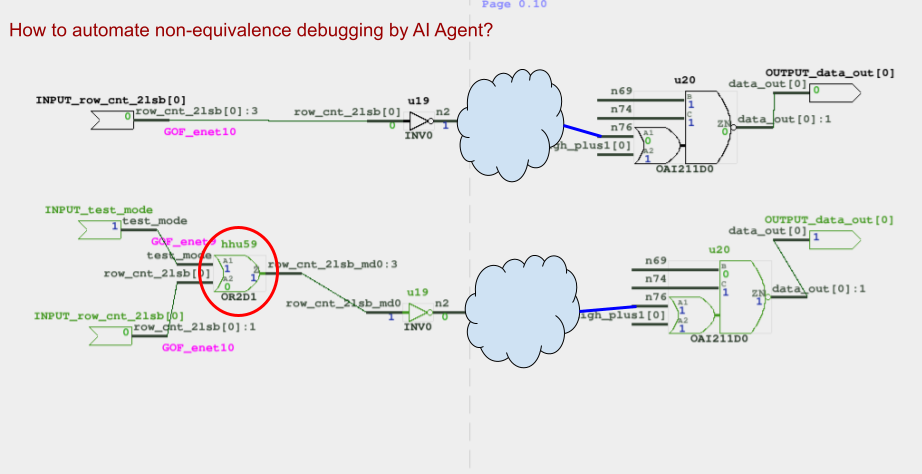
Chip designers have long faced a tedious, manual process when debugging non-equivalent points in a netlist—the discrepancies between a reference design and an implemented one. Even with tools like GOF Debug, which offer powerful features like counter-example tracing on schematics, the designer must still be an active participant. They're required to manually read logic values and click through the design to trace the issue back to its source.

Enter the new era of AI Agent-driven debug automation. By leveraging the power of Large Language Models (LLMs), the GOF platform is now capable of turning this manual, graphical process into a fully automated one, significantly reducing debugging time and effort.

Figure 2: How to automate the schematic non-equivalence debugging?

AI Agent Transformation

An AI agent, powered by a Large Language Model (LLM), automates the debugging process. Instead of a human, the AI agent takes charge.

Figure 3: AI Agent automates the debugging

Example code

Example script for AI Agent Non-equivalence debugging:

set_log_file("ai_dbg_noneq.log");
read_library("tsmc.lib");
read_design('-ref', "ref_netlist.v");
read_design('-imp', "imp_netlist.v");
set_ai_remote_server("localhost", 1998, 0, "___ENDQQ___", "___ENDAA___", "LLM_1_0_0");
ai_debug_noneq("data_out[0]");

Future Work

This powerful AI agent-driven approach is not limited to just netlist non-equivalence issues. The same methodology can be applied to gate-level netlist simulation debugging. By feeding the AI agent with simulation waveforms and netlist data, it can analyze discrepancies between expected and simulated values. The agent then intelligently navigates the design to pinpoint the exact source of a functional error. This adaptability highlights the immense potential of AI agents to revolutionize a wide range of debugging and verification tasks throughout the entire chip design workflow.


Follow us:
© 2026 NanDigits Design Automation. All rights reserved.