

GOF AI · Agentic AI Skill
GOF ships a SKILL.md that lets Claude Code, Codex, and opencode drive the GOF ECO engine directly. Issue one natural-language instruction and the agent generates a GOF run script, executes it, and orchestrates the full workflow — no scripting expertise required.
Most attempts to put AI into EDA follow the same recipe: bolt a large language model onto the EDA tool and hope the engineer learns a new chat window. The new GOF release flips that direction — it brings the EDA tool into the agentic CLI the engineer is already working in.
Netlist ECO has always carried a steep scripting tax. Even experienced engineers returning from another project end up back in the user manual, relearning API names, argument order, and the exact - placeholder that change_pin expects. The work that actually matters — deciding what to change and verifying it — gets buried under the mechanics of how to write the script.
Agentic CLIs have already absorbed that kind of syntax overhead in software engineering. The GOF Skill extends the same idea to silicon: the agent holds the API knowledge, the engineer holds the intent, and the gap between them closes to a single sentence.
SKILL.md lives in the GOF install directory alongside bin/ and scripts/. It is not a thin prompt. It is a self-contained skill definition that tells the agentic CLI three things:
gofai_server.py) that wraps the chosen CLI platform and starts once per host.gof -run, which behaves as the GOFAI client, in a non-blocking terminal so the agent never blocks on a long engine run.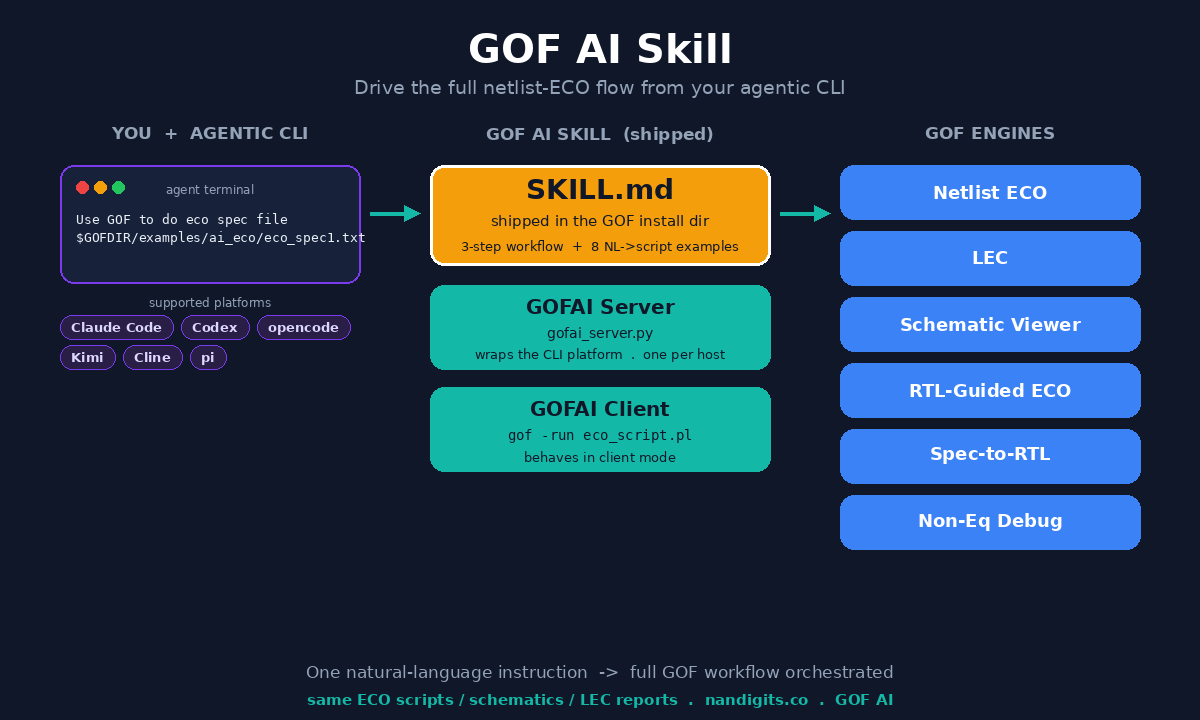
The agent does not free-form the script. It selects the closest of the eight embedded examples, fills in your files, library, top module, and constraints, and writes a standard, timestamped GOF Perl script — for example eco_script_1781997676.pl. Because the output is an ordinary GOF script, everything downstream is unchanged: the ECO reports, schematics, and LEC results are identical to what the manual and API flows produce, and you debug them in GOF Debug as usual.
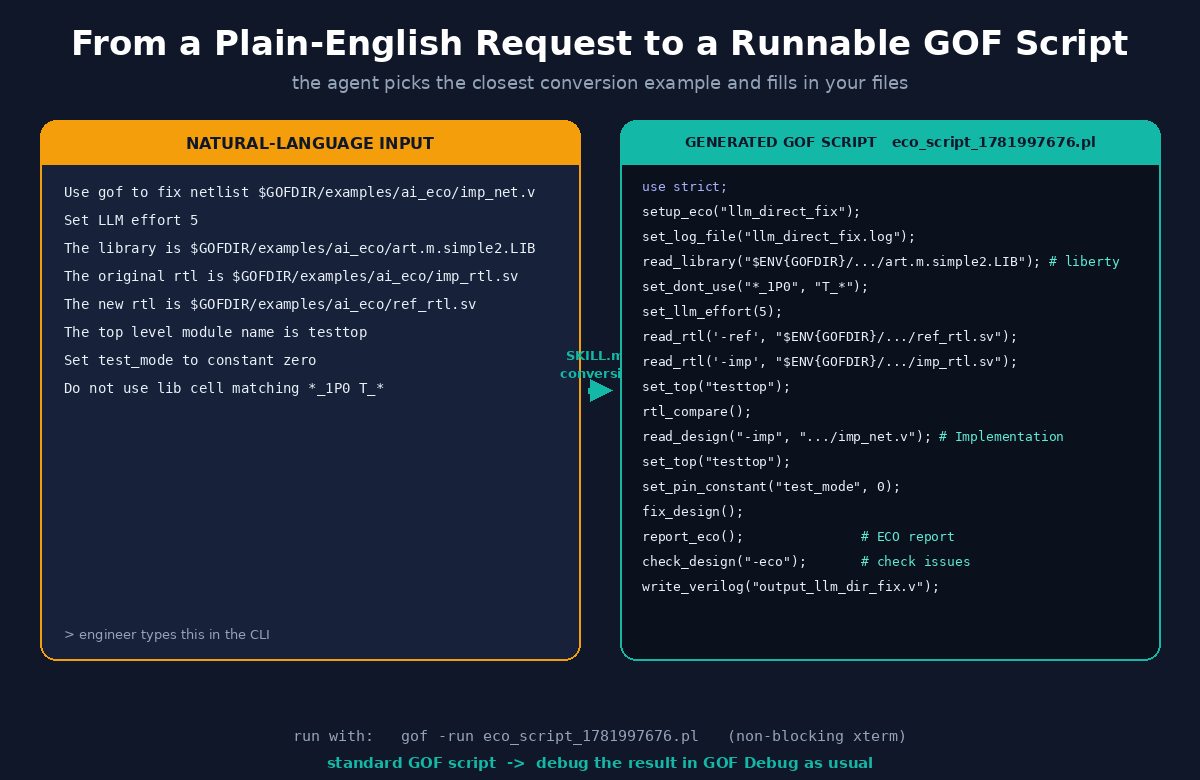
Here is the same transformation in text. An engineer types this in the CLI:
Use gof to fix netlist $GOFDIR/examples/ai_eco/imp_net.v
Set LLM effort 5
The library is $GOFDIR/examples/ai_eco/art.m.simple2.LIB
The original rtl is $GOFDIR/examples/ai_eco/imp_rtl.sv
The new rtl is $GOFDIR/examples/ai_eco/ref_rtl.sv
The top level module name is testtop
Set test_mode to constant zero
Do not use lib cell matching *_1P0 T_*
and the agent produces this GOF run script:
use strict;
setup_eco("llm_direct_fix");
set_log_file("llm_direct_fix.log");
read_library("$ENV{GOFDIR}/examples/ai_eco/art.m.simple2.LIB"); # Read in liberty file
set_dont_use("*_1P0", "T_*");
set_llm_effort(5);
read_rtl('-ref', "$ENV{GOFDIR}/examples/ai_eco/ref_rtl.sv");
read_rtl('-imp', "$ENV{GOFDIR}/examples/ai_eco/imp_rtl.sv");
set_top("testtop");
rtl_compare();
read_design("-imp", "$ENV{GOFDIR}/examples/ai_eco/imp_net.v");  # Read in Implementation Netlist
set_top("testtop");
set_pin_constant("test_mode", 0);
fix_design();
report_eco();                     # ECO report
check_design("-eco");             # Check if the ECO causes any issue
write_verilog("output_llm_dir_fix.v");
The script is then launched in a non-blocking xterm so the agent stays responsive while the GOF engine runs:
nohup xterm -e "tmux new-session -s GOFAI_CLIENT_rtl_guided_eco \
  '$GOFDIR/bin/gof -run eco_script_1781997676.pl'" &
The GOFAI server takes a --platform option, so the same skill works across the tools your team already uses:
The differentiator is not the natural-language layer — several tools have that. The differentiator is where the orchestration lives. When the EDA tool is brought into the agent, one instruction drives the whole workflow against the real engines, and the artifacts stay auditable. You are not inspecting a magic patch; you are inspecting a GOF Perl script that your most senior engineer would recognize and could have written by hand.
That has two practical consequences for a design team:
GOFDIR to point at the install directory (the folder containing bin/, scripts/, and SKILL.md).$GOFDIR/SKILL.md into your CLI’s skill directory (e.g. .claude/skills/gof/SKILL.md), or symlink the skill folder to $GOFDIR so it tracks every release.Use GOF to do eco spec file $GOFDIR/examples/ai_eco/eco_spec1.txtThe agent reads the skill, launches the GOFAI server, converts the request into a GOF run script, and executes it. The resulting ECO scripts, schematics, and LEC reports can be inspected and debugged with GOF Debug.
One natural-language instruction, one orchestrated workflow, same auditable artifacts.
The broader direction is straightforward: the engineer’s intent and the EDA engine should be separated by as little as possible. The GOF Skill closes that gap to a single sentence — without giving up the scripts, reports, and debug visibility that a regulated tape-out still demands.